Help
Help
Alpine RUE-4360 Wireless Remote Control (RUE4360)

Product Description
Product Description
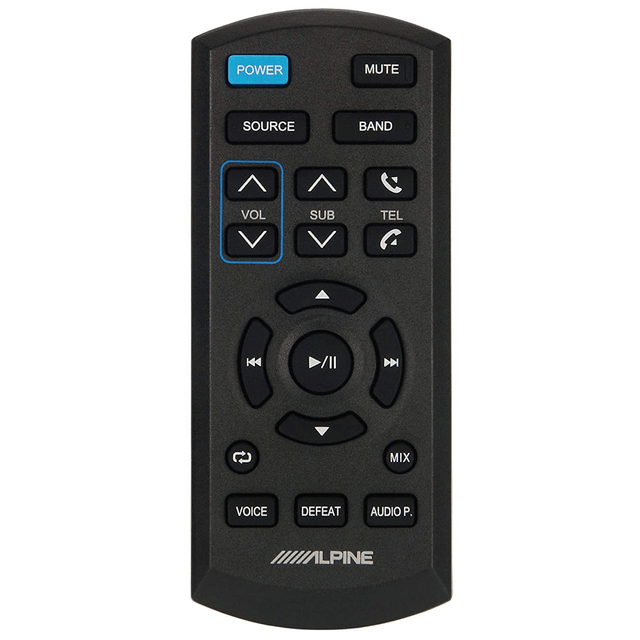
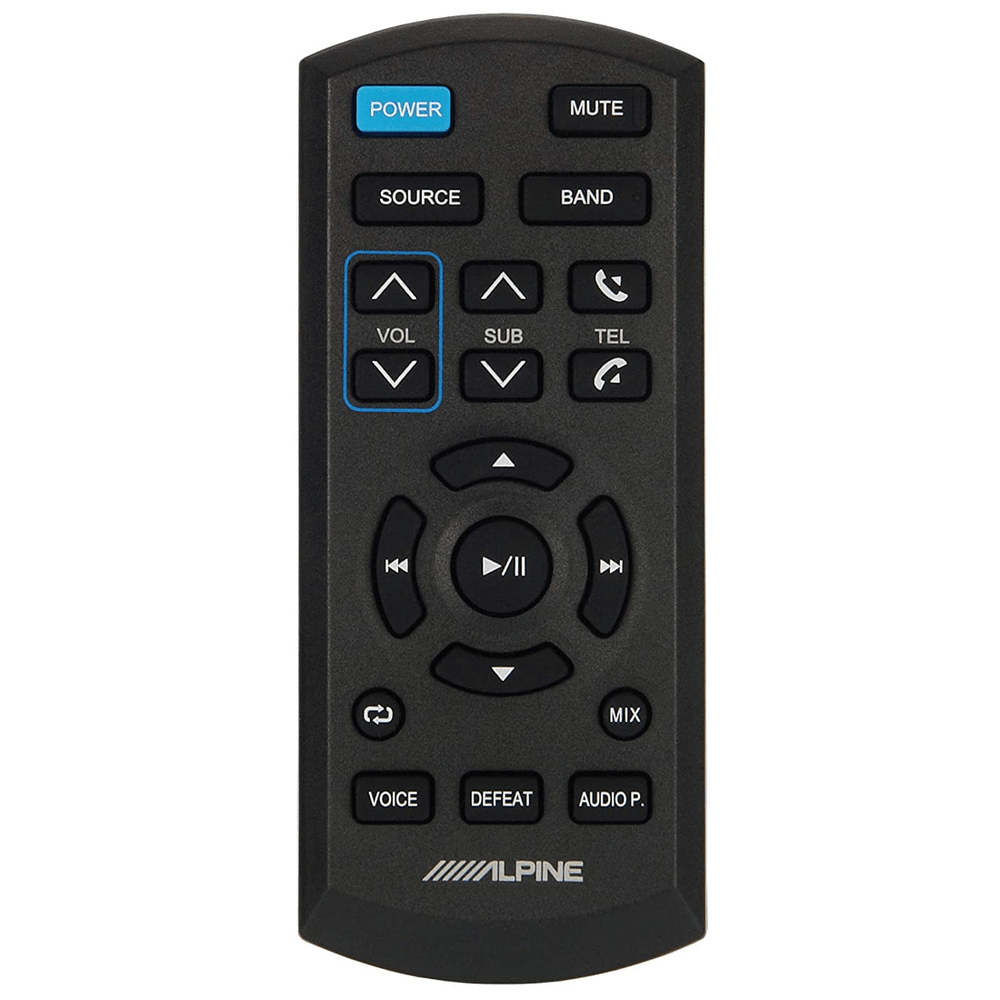
Alpine RUE-4360 Wireless Remote Control
Alpine RUE-4360 Buttons
Power Button: Press the button to turn the power on/off.
Source Button: Press to select the audio source.
Volume Up Button: Press the button to increase the volume level.
Subwoofer Level Buttons: Press ‘+’ to increase and ‘-’ to decrease the subwoofer level.
Volume Down Button: Press the button to decrease the volume level.
Radio Button: Radio Mode: Next Preset
USB/ MP3 Mode: Folder Up
Audio Processor Mode: Press this button to adjust the MODE that is called by pressing the AUDIO P. button.
Seek Back Button: Press to seek down a station in radio mode or down a track, chapter, etc., in other audio/visual sources.
Repeat Button: USB/ MP3 Mode: Press the button to repeat the current track.
Voice Button: Depending on the connected smartphone, press to recall Siri function or voice recognition mode.
Mute Button: Press to activate/deactivate the mute mode.
Band Button: Toggle Band in radio mode.
Pick Up Button: Press the button to accept an incoming phone call.
Hang Up Button: Press the button to reject an incoming phone call or to end a phone call.
Play/Pause Button: Press the button to switch between the Play and Pause modes for USB/ MP3 playback.
Seek up Button: Press to seek up a station in radio mode or up a track, chapter, etc., in other audio/visual sources.
Button Radio Mode: Previous Preset
M.I.X. Button: USB/ MP3 Mode: Random playback order of tracks.
*Audio Processor Button: Each press of the button changes the external audio processor mode.
Press or button to perform setting / adjustment.
For the operation of external audio processor, refer to the Owner’s Manual of
the external audio processor you purchased.
Defeat Button: Press the button to toggle defeat on/off
Features & Specs
Features & Specs
Documents
Documents
Warranty
Warranty
Save $57.00
We guarantee the best price in Canada—before or 30 days after purchase.*
 Lowest Price Guarantee*
This product is backorderable

Sign up to get notified when it's in stock!

Call 1-866-696-7189

Does not apply to special order items.
Product Description
Product Description
Alpine RUE-4360 Wireless Remote Control
Alpine RUE-4360 Buttons
Power Button: Press the button to turn the power on/off.
Source Button: Press to select the audio source.
Volume Up Button: Press the button to increase the volume level.
Subwoofer Level Buttons: Press ‘+’ to increase and ‘-’ to decrease the subwoofer level.
Volume Down Button: Press the button to decrease the volume level.
Radio Button: Radio Mode: Next Preset
USB/ MP3 Mode: Folder Up
Audio Processor Mode: Press this button to adjust the MODE that is called by pressing the AUDIO P. button.
Seek Back Button: Press to seek down a station in radio mode or down a track, chapter, etc., in other audio/visual sources.
Repeat Button: USB/ MP3 Mode: Press the button to repeat the current track.
Voice Button: Depending on the connected smartphone, press to recall Siri function or voice recognition mode.
Mute Button: Press to activate/deactivate the mute mode.
Band Button: Toggle Band in radio mode.
Pick Up Button: Press the button to accept an incoming phone call.
Hang Up Button: Press the button to reject an incoming phone call or to end a phone call.
Play/Pause Button: Press the button to switch between the Play and Pause modes for USB/ MP3 playback.
Seek up Button: Press to seek up a station in radio mode or up a track, chapter, etc., in other audio/visual sources.
Button Radio Mode: Previous Preset
M.I.X. Button: USB/ MP3 Mode: Random playback order of tracks.
*Audio Processor Button: Each press of the button changes the external audio processor mode.
Press or button to perform setting / adjustment.
For the operation of external audio processor, refer to the Owner’s Manual of
the external audio processor you purchased.
Defeat Button: Press the button to toggle defeat on/off